Optional. Choose the tone that fits your catalogue, or leave it to the AI.
Optional. Natural textures and protective styles.
Describe specific model characteristics (appearance, body type, features)
Describe the scene or location
Describe the model's pose
Describe the lighting style
Describe facial expression
Overall photography style
Camera angle for the shot
Overall mood and atmosphere
Upload Product/Clothing Image
The options below are optional and already filled in.
Preview
Upload your product, get a Black model wearing it
One photo of your garment in, on-model product photos out. No shoot, no studio.
1. Upload your product
A flat lay, hanger or mannequin photo of your garment.
2. Pick the model (optional)
Skin tone, hair style, scene and pose, or let the AI choose.
3. Get a Black model wearing it
An on-model photo for your store, listing or social post.
Example: one shirt photo, three models
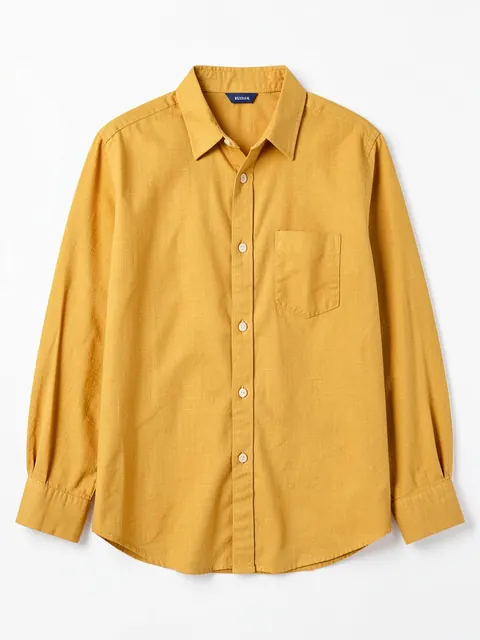
Example upload: Flat lay (sample image) 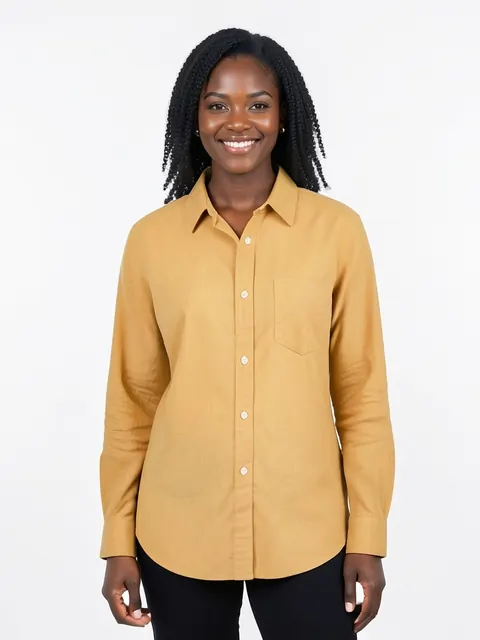
Result: Tone and hair: AI chooses 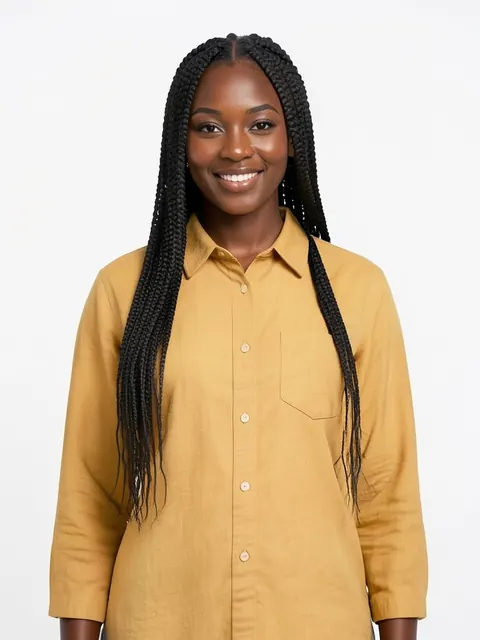
Result: Deep brown, box braids 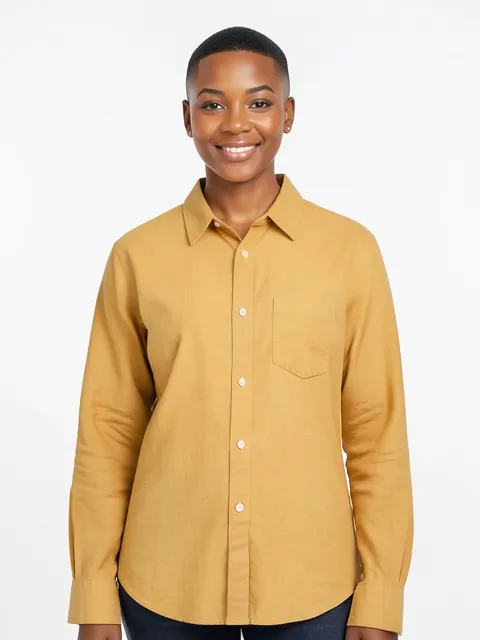
Result: Medium brown, short fade
Made with this tool's own model from the sample shirt image shown first. Results vary from run to run, so make a few versions and keep the one that shows your garment best. Always check colour and details against the real product.
Preview
Your image will appear here
Upload an image and click Generate to see your AI-enhanced preview
AI Black Model Generator
Generate stunning Black fashion models for inclusive representation
Overview
Generate stunning Black fashion models for inclusive representation Our AI-powered tool generates professional-quality images perfect for e-commerce, marketing, and social media. Save thousands on traditional photoshoots while getting stunning results in seconds.
- •Professional AI-generated photography
- •Customizable scenes, poses, and lighting
- •High-resolution output for any use
- •Cost-effective alternative to photoshoots
- •Fast generation in seconds
Features
AI-Powered Generation
Advanced AI creates professional photography instantly
High Resolution Output
Get studio-quality images ready for e-commerce
Customizable Settings
Control poses, lighting, scenes, and more
Fast Processing
Generate images in seconds, not hours
Commercial License
Full rights to use generated images commercially
Use Cases
E-commerce Product Photography
Use AI Black Model Generator for professional product listings that convert.
Key Benefits:
- •Increase conversion rates
- •Consistent brand imagery
- •Cost-effective photography
Social Media Marketing
Create scroll-stopping content for Instagram, TikTok, and Pinterest.
Key Benefits:
- •Engaging visual content
- •Brand consistency
- •Rapid content creation
Fashion Catalogs
Generate complete fashion catalogs without expensive photoshoots.
Key Benefits:
- •Professional quality
- •Diverse model options
- •Quick turnaround
Frequently Asked Questions
AI models for your clothes
Show your pieces on models of every skin tone, body and style: men, women, streetwear, activewear, evening wear, wigs and jewelry.
- AI Black Fashion Model Generator
- AI Female Model for Clothing
- AI Male Model for Clothing
- AI African Model Generator
- AI Jamaican Model
- AI Man Generator
- AI Woman Generator
- AI Outfit Generator
- AI Streetwear Model
- AI Activewear Model
- AI Evening Gown Model
- AI Wig Model Generator
- AI Hair Accessories Model
- AI Jewelry Model
More for clothing sellers
Black model photos for your clothing brand
Show your own garment on a Black model without booking a shoot. Upload a product photo, describe the model you want, and get on-model images you can put on a product page the same day.
How sellers use it
- 1
Upload your garment photo
A flat lay, a hanger shot or a mannequin photo works. A plain or white background and the whole garment in frame give the cleanest result.
- 2
Choose the model and the shot
Pick a skin tone and a hair style (afro, box braids, locs, twists, cornrows and more), then set the scene, pose and lighting. Leave any of it blank and the AI picks for you.
- 3
Generate, compare, download
Each image costs 1 credit. Make a few versions, keep the one that shows the garment best, and use it on your store, marketplace listing or social post.
What brands make with it
- Shopify, Etsy and Amazon product images on a model, instead of a flat lay only
- One garment shown on several skin tones and hair styles, so more shoppers see themselves
- New drops and pre-orders before samples are ready for a shoot
- Instagram and TikTok posts, lookbooks and ads for small brands without a studio budget
Photo tips for the best result
- •Use a sharp photo with the garment flat and unfolded. Wrinkles and shadows can show up in the result.
- •Shoot prints, logos and colour in daylight. The AI follows what it can see.
- •Upload one garment per photo, so the AI knows which piece to put on the model.
- •Check every image against the real product (colour, print, logo, length, fit) before you publish it.
Questions from brands
- What photo of my product should I upload?
- A flat lay, a hanger shot or a mannequin photo of one garment, sharp and fully in frame, on a plain or white background.
- Can I choose the model’s skin tone and hair?
- Yes. Pick a skin tone from deep to light brown and a hair style such as box braids, locs, an afro, twists or a short fade. Leave them blank and the AI chooses.
- Will the garment look exactly like mine?
- The AI follows your photo closely, but colours can shift a little and small details can change. Make a few versions and compare each one with the real product before you publish it.
- Is the model a real person?
- No. Every model is generated by AI and is not a real person. Do not present the image as a photo of a real model or creator.
- Should I tell shoppers the model is AI generated?
- We recommend it. Some marketplaces and ad platforms have rules on AI imagery, so check the rules where you sell. The garment itself must look the way it really is.
- What does it cost?
- Each image costs 1 credit, and you can start free. Free images carry a watermark and a smaller size; a plan removes the watermark and adds credits for brands that need images every week.
More AI Fashion Model Tools
- AI Latina Model Generator
- AI European Model Generator
- AI Spanish Model Generator
- AI Redhead Model Generator
- AI Brunette Model Generator
- AI Chinese Fashion Model
- AI Emirati Model Generator
- AI Mexican Fashion Model
- AI Jamaican Model Generator
- AI Bahamian Model Generator
- AI Guyanese Model Generator
- AI Cuban Fashion Model
- AI Ethiopian Model Generator
- AI Afro Fashion Photography
- AI Adult Nigeria Fashion Model
- AI Adult Kenya Fashion Model